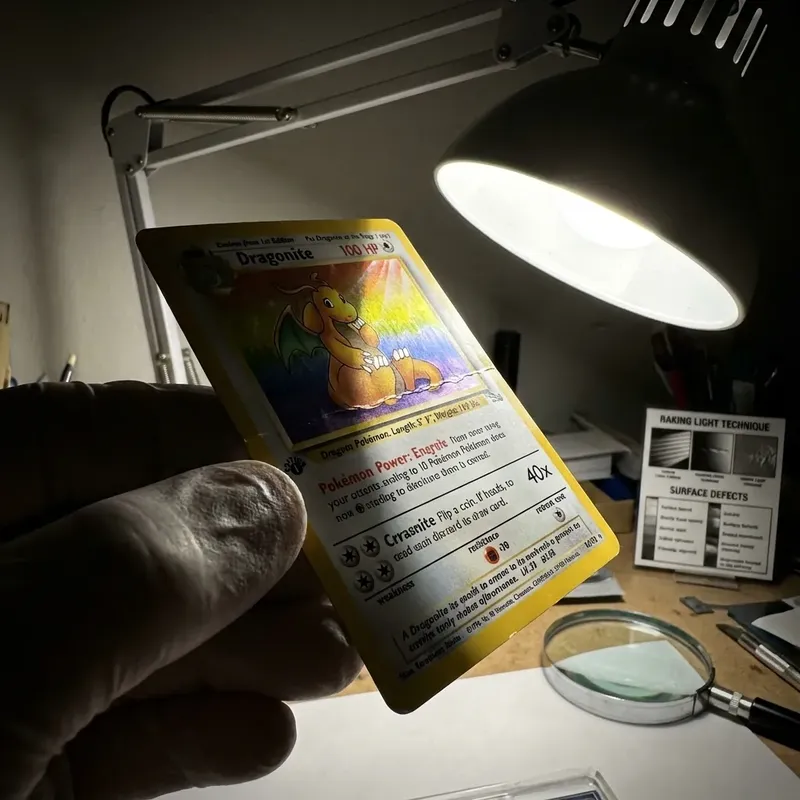
The "Head-On" Photograph Lie
99% of eBay listings show the card scanned or photographed directly from the front. This hides surface indentations, wrinkles, and scratches.
Light hitting a card at a 90-degree angle washes out shadows. To see defects, you need shadows.
Technique 1: The Raking Light
Hold the card flat in your palm. Use your phone flashlight or a desk lamp.
Tilt the card until the light hits the surface at a 15-degree angle (almost parallel to the surface). Slowly rotate the card.
- Indentations: Will appear as dark craters.
- Wrinkles: Will look like mountain ridges.
- Scratches: Will flash white against the gloss.
Technique 2: The "Corner Tap"
Sometimes a corner looks sharp but feels soft. This is a "bruised corner."
Gently run your finger across the corner (not into it). If it feels like a sharp needle, it is Mint. If it feels fuzzy or rounds off, the structural integrity is compromised.
Dealer Secret: The "Sound" Test
Drop the card (in a top loader) flat onto a table from 1 inch. Does it "clack" or "thud"? A "clack" means the layers are tight. A "thud" can indicate water damage or separation.
The 30-Second Workflow
- Back First (10s): Dealers always look at the back first. If the back has whitening, the front doesn't matter.
- Raking Light (10s): Spin under light for surface checks.
- Centering Glance (5s): Is it clearly off? Reject.
- Corner Zoom (5s): Quick loupe check on the weakest corner.
Final Verdict
If a seller only provides one flat photo and refuses to send "angled" pictures, assume the surface is damaged.