The Short Answer
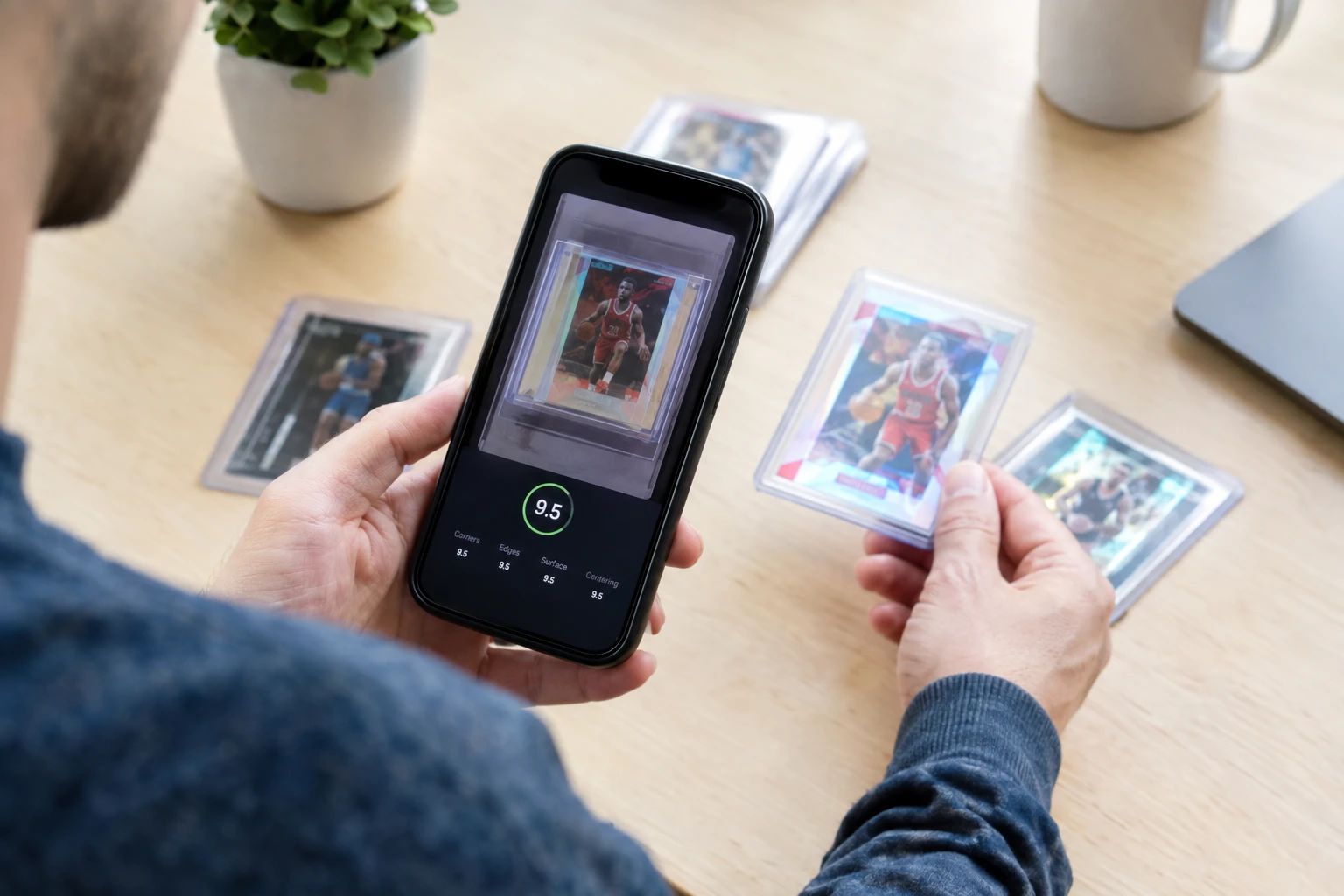
- AI card grading uses computer vision to analyze a photo of your card and predict the grade a professional grader would assign — in 30-90 seconds for $0-$2.
- It is not a replacement for professional grading — AI predicts; PSA, BGS, and CGC certify. Use AI to decide which cards to submit.
- AI grading is 89% accurate within one grade point of PSA on 10,000 verified cards — enough to make confident submission decisions.
- The four pillars of grading are centering, corners, edges, and surface — AI evaluates all four from your photos.
- Free tiers exist — PreGradeCards offers 50 free credits, MasterGrade gives 3 free grades per day, CardSense AI is free on iOS.
- The workflow is simple: photograph, upload, get prediction, sort by grade, submit only PSA 9+ candidates.
- AI saves collectors $750-$2,800 per 50-card batch by filtering out cards that would waste submission fees.
What Is AI Card Grading?
AI card grading is the use of artificial intelligence — specifically computer vision — to analyze a photograph of a trading card and predict the grade a professional grading company (PSA, BGS, CGC, or SGC) would assign to it. Instead of mailing your card to PSA, paying $25-$150, and waiting months, you take a photo with your phone, upload it to an AI tool, and get a predicted grade in 30-90 seconds for $0-$2.
Think of it as a pre-screening tool. AI grading does not replace professional grading — only PSA, BGS, CGC, and SGC can assign official grades that carry market value. Instead, AI grading tells you whether your card is worth paying for professional grading. If the AI says your card will likely get PSA 8, you save $80 by not submitting it. If the AI says PSA 10 with high confidence, you submit with confidence.
The concept is simple: grade with AI first, submit only the winners to PSA. This filters out the cards that would waste your money and identifies the cards with genuine profit potential. In 2026, with PSA at $79.99 per card and an 11.85 million card backlog, this pre-screening step is not optional — it is essential.
AI card grading emerged as a consumer-facing tool around 2022-2023 and has grown rapidly. In 2026, over a dozen platforms offer AI grading, including PreGradeCards, CardGrade.io, CardSense AI, TCGrader, ZeroPop, SnapGradeAI, MasterGrade.ai, Gradeon.ai, and others. The market is competitive, which means better tools, lower prices, and free tiers for collectors.
How AI Card Grading Works (Simple Version)
You do not need to understand machine learning to use AI card grading. But understanding the basics helps you trust the results. Here is the simple version:
1. You Upload a Photo
You take a photo of the front and back of your card and upload it to an AI grading platform. The photo needs to be clear, well-lit, and taken from directly above the card. Think of it as taking a photo for an eBay listing — same quality standards.
2. The AI Finds the Card
The AI identifies the card within your photo — finding the four corners, removing the background, and isolating just the card. This is called "segmentation" and it is the same technology that lets your phone's camera detect faces.
3. The AI Analyzes the Card
The AI examines the card the way a professional grader would — checking centering, corners, edges, and surface. But instead of using a loupe and raking light, it uses pixel analysis. It measures border widths to determine centering. It checks corner pixels for whitening. It scans edges for chipping. It looks for surface defects like print lines and scratches.
4. The AI Predicts the Grade
Based on its analysis, the AI outputs a predicted grade on the PSA 1-10 scale (and often BGS and CGC scales too). It also provides sub-grade breakdowns for each of the four pillars and a confidence score indicating how certain it is about the prediction.
5. You Get Results in 30-90 Seconds
The entire process takes 30-90 seconds. You see the predicted grade, sub-grades, confidence score, and sometimes a visual overlay showing exactly where the AI found condition issues. Then you decide: submit to PSA or sell raw.
The Four Pillars: What AI Evaluates
Professional grading companies evaluate cards on four criteria. AI evaluates the same four. Understanding these pillars is the foundation of card grading knowledge:
1. Centering
How evenly the printed image sits within the card's borders. Expressed as a ratio: 55/45 means one border is 55% and the opposite is 45%. PSA 10 requires 60/40 or better. Centering is the #1 grade killer — 20% of cards that look fine to the naked eye are actually 60/40 or worse. AI measures centering with 99.2% accuracy using pixel-level border measurement.
2. Corners
The four corners of the card are inspected at 10x magnification. Graders look for whitening (white spots on dark borders), fraying (fibers sticking out), softening (rounded instead of sharp), and dinging (bent or compressed). Even one damaged corner can drop a card from PSA 10 to PSA 8. AI corner accuracy: 93% within plus or minus 0.5 subgrade.
3. Edges
The perimeter of the card is checked for wear, chipping, silvering (silver-colored wear on foil edges), whitening, and rough cuts. Edge wear is most visible on dark-bordered cards (Pokemon, MTG) where white chipping stands out. AI edge accuracy: 87.6% within plus or minus 0.5 subgrade.
4. Surface
The front and back surfaces are checked for print lines, scratches, dents, stains, indentations, and gloss disruptions. Surface is the hardest pillar for AI to assess from photos because some defects are only visible under specific lighting angles. AI surface sensitivity: 76%, improving to 91% with dual-angle scan input. This is where manual inspection with raking light and UV light still outperforms AI.
How Accurate Is AI Card Grading?
This is the #1 question beginners ask. The answer: AI card grading is accurate enough to make confident submission decisions, but not perfect. Here are the key numbers from published studies:
- 89% within one grade point of PSA on 10,000 cards (PreGradeCards benchmark)
- 87% within plus or minus 0.5 on 412 verified PSA returns (SnapGradeAI)
- 92.8% within one grade point claimed by CardGrade (model outputs, not verified returns)
- 100% consistency — the AI gives the same grade every time, unlike human graders who show 18% variance
What does "89% within one grade point" mean in practice? If the AI predicts PSA 9, the actual PSA grade will be 8, 9, or 10 about 89% of the time. The other 11% of the time, it might be off by more than one grade (e.g., predicting PSA 9 when the card gets PSA 7).
Accuracy varies by card type:
- Modern cards (2010+): 93% — best performance, consistent manufacturing
- Pokemon TCG: 91% — strong, improved by CGC training data
- Vintage pre-1960: 71% — worst performance, unusual aging patterns
For beginners: if you collect modern cards or Pokemon, AI grading is highly reliable. If you collect vintage, use AI as a first filter but rely more on manual inspection. For a complete deep dive, see our AI Card Grading Accuracy Benchmark guide.
AI Grading vs Professional Grading
The most important thing to understand: AI grading and professional grading serve different purposes. They are complements, not competitors.
| Feature | AI Grading | Professional Grading (PSA) |
|---|---|---|
| Purpose | Pre-screening | Official certification |
| Cost | $0-$2/card | $15-$300/card |
| Time | 30-90 seconds | 5-150 working days |
| Card stays with you? | Yes | No (mailed to PSA) |
| Official grade? | No (prediction) | Yes (certified) |
| Authentication? | No | Yes |
| Slab included? | No | Yes |
| Resale value? | None (just prediction) | Yes (slab carries premium) |
The workflow: use AI to filter your collection, then send only the best candidates to PSA for official grading. AI is the screening tool; PSA is the certifier. You need both.
How Much Does AI Card Grading Cost?
AI card grading is dramatically cheaper than professional grading. Here is the pricing landscape:
Free Options
- PreGradeCards: 50 free credits on signup (no credit card)
- MasterGrade.ai: 3 free grades per day (no account needed)
- CardSense AI: Free iOS app with unlimited basic scanning
- ZeroPop: 1 free browser grade (no account)
- figoca: Unlimited free for sports cards
Paid Options
- PreGradeCards: $0.19-$2 per card (pay-as-you-go, no subscription)
- SnapGradeAI: $1-$2 per credit (credits never expire)
- CardGrade.io: $4.99/month subscription
- ZeroPop: $4.99-$15.99/month
- TCGrader: 9.99/month
- CardGrading.app: $3.49/month (cheapest subscription)
Compare this to PSA at $15-$300 per card. AI grading costs 1/100th to 1/1000th of professional grading. Even if you use paid AI tools, you will spend $5-$50 to pre-screen 50 cards, compared to $750-$4,000 to submit those same 50 cards to PSA.
For a complete guide to free options, see our Free AI Card Grading Tools guide.
Best AI Card Grading Tools for Beginners
For beginners, the best tool is one that is free, easy to use, and provides clear results. Here are our top recommendations:
Best Overall for Beginners: PreGradeCards
- 50 free credits on signup
- Supports sports cards, Pokemon, MTG, Yu-Gi-Oh!, and more
- Full sub-grade breakdowns with confidence scores
- Batch grading for processing multiple cards at once
- Published 10,000-card accuracy study
- Web-based — works on any device with a browser
Best for Quick Free Checks: MasterGrade.ai
- 3 free grades per day, no account required
- 30-second results
- Sub-grades and estimated market value
- Lowest friction — just visit and upload
Best for iPhone Users: CardSense AI
- Free iOS app
- All-in-one: scanning, grading, identification, market values
- PSA, BGS, and SGC predictions
- Collection tracking with cloud sync
Best for Pokemon: SnapGradeAI
- 3 free scans on signup
- Best published Pokemon accuracy: 89% within plus or minus 0.5
- Full transparency — every miss published
- Credits never expire
For the complete comparison of all tools, see our Best AI Card Grading Apps Compared 2026 guide.
The Beginner's Step-by-Step Workflow
Here is the complete workflow from raw card to submission decision, designed for beginners:
Step 1: Set Up Your Photo Station
Find a flat surface with good lighting. Use daylight from a window or a daylight-balanced LED light. Place a black or white background (poster board works). Position your phone directly above the card.
Step 2: Photograph Front and Back
Take a clear, high-resolution photo of the front of the card. Then flip it and photograph the back. Fill the frame with the card, leaving a small margin. No flash. Keep the phone steady.
Step 3: Upload to an AI Grading Tool
Go to PreGradeCards Complete Card Grading (or any tool from our recommendations). Upload the front and back photos. Wait 30-90 seconds.
Step 4: Read Your Results
You will see:
- Predicted grade: e.g., "PSA 9.2"
- Sub-grades: Centering 9.5, Corners 9, Edges 9, Surface 8.5
- Confidence score: e.g., 85% confident
- Visual overlay: Marked-up image showing where issues were found
Step 5: Make Your Decision
- If PSA 9+ with 80%+ confidence: Submit to PSA. This is a good candidate.
- If PSA 7-8: Sell raw. Not worth the grading fee.
- If PSA 6 or below: Hold. Not worth grading or selling individually.
Step 6: Submit to PSA (If Applicable)
If you decide to submit, go to psacard.com, create an account, select a submission tier, print the submission form, package your cards in card savers (not toploaders), and ship via tracked insured mail. For a complete guide to this process, see our PSA Pre-Grader Guide.
Tips for Getting the Best AI Grade Results
1. Photo Quality Is Everything
The AI can only analyze what it can see. Blurry, dim, or poorly framed photos produce inaccurate results. Invest 2 minutes in setting up good lighting and positioning — it makes every prediction more reliable.
2. Always Photograph the Back
Back-corner whitening is the #1 grade killer on Pokemon cards. If you only photograph the front, the AI cannot detect it. Always upload both front and back.
3. Use Confidence Scores
A prediction with 90% confidence is trustworthy. A prediction with 60% confidence is a coin flip. Always factor confidence into your submission decisions. Set a threshold: only submit cards with 80%+ confidence.
4. Cross-Check with Manual Inspection
For high-value cards, do a quick manual check. Use a 10x jeweler's loupe ($10) to check corners. Use a raking light (hold the card at an angle under a single light) to check surface. This catches issues the AI might miss, especially surface defects.
5. Start with Free Credits
Do not pay for AI grading until you have tried the free tiers. PreGradeCards gives 50 free credits. MasterGrade gives 3 free grades per day. Try multiple tools on the same card to see which gives the most detailed and consistent results.
6. Keep Records
Track your AI predictions and actual PSA results in a spreadsheet. Over time, you will learn which tools are most accurate for your specific card types and build confidence in the technology.
Common Beginner Mistakes to Avoid
1. Treating AI Grade as Official
The AI grade is a prediction, not a certification. Do not list a card as "PSA 9" on eBay based on an AI prediction. Either submit to PSA for an official grade or list it as "AI pre-graded: PSA 9 predicted."
2. Bad Photos
The #1 cause of inaccurate AI predictions. Dim lighting, camera angle, motion blur, and glare all reduce accuracy. Take 30 seconds to set up a proper photo station.
3. Ignoring Confidence Scores
A PSA 10 prediction with 50% confidence is not a strong submit signal. Always check confidence. If it is below 70%, do a manual verification before submitting.
4. Submitting Every Card the AI Says PSA 10
The false positive rate is 11%. For every 9 cards the AI says will get PSA 10, 1 will come back lower. For high-value cards, do a manual check before submitting.
5. Not Checking Population Reports
A PSA 10 card with 10,000 existing PSA 10s may not be worth the grading fee. Always check the PSA population report before submitting.
6. Over-Tiering PSA Submissions
Do not submit a $100 card at PSA Regular ($79.99) when Value ($25) would work. The grade is the same regardless of tier. You pay for speed and declared value, not a better grade.
AI Card Grading Glossary
Key terms every beginner should know:
| Term | Definition |
|---|---|
| Centering | How evenly the image sits within the card borders. Expressed as L/R and T/B ratios (e.g., 55/45). |
| Sub-grades | Individual scores for centering, corners, edges, and surface. More informative than a single overall grade. |
| Confidence score | How certain the AI is about its prediction. 90% = high confidence. 60% = uncertain. |
| PSA 10 (Gem Mint) | The highest PSA grade. Requires 60/40 centering, no visible wear at 10x, clean edges, full gloss. |
| Pre-grading | Evaluating a card's condition before submitting to professional grading. AI tools are pre-graders. |
| Population report (pop report) | A database showing how many cards have been graded at each grade level by a grading company. |
| Slab | The sealed plastic case that a professional grading company puts your card in after grading. |
| Card saver | A rigid plastic holder used for shipping cards to PSA. PSA requires card savers, not toploaders. |
| Computer vision | The AI technology that analyzes images. Same tech behind facial recognition and self-driving cars. |
| Raking light | Holding a card at a low angle under a single light source to reveal surface indentations and defects. |
Ready to start? Sign up for PreGradeCards and get 50 free credits — no credit card required. Try it on 2-3 cards from your collection and see the results for yourself.
Sources & Further Reading
- PreGradeCards — AI Grading Accuracy Benchmark (10,000 Cards)
- SnapGradeAI — 412 Verified PSA Returns
- TCGrader — AI vs PSA Grading Accuracy
- CardGrade.io — Best AI Card Grading App Guide
- CardSense AI — PSA Pre-Grader
- PSA — Official Grading Standards
Marcus Chen has evaluated over 50,000 sports cards and TCG cards across PSA, BGS, SGC, and CGC standards. Before joining PreGradeCards, he worked as a submission specialist for a major grading company and trained collectors and dealers on condition assessment.
Create a free account and get 1 free credit — enough for 1 complete AI grading with market pricing. No credit card required.
Sign Up Free →