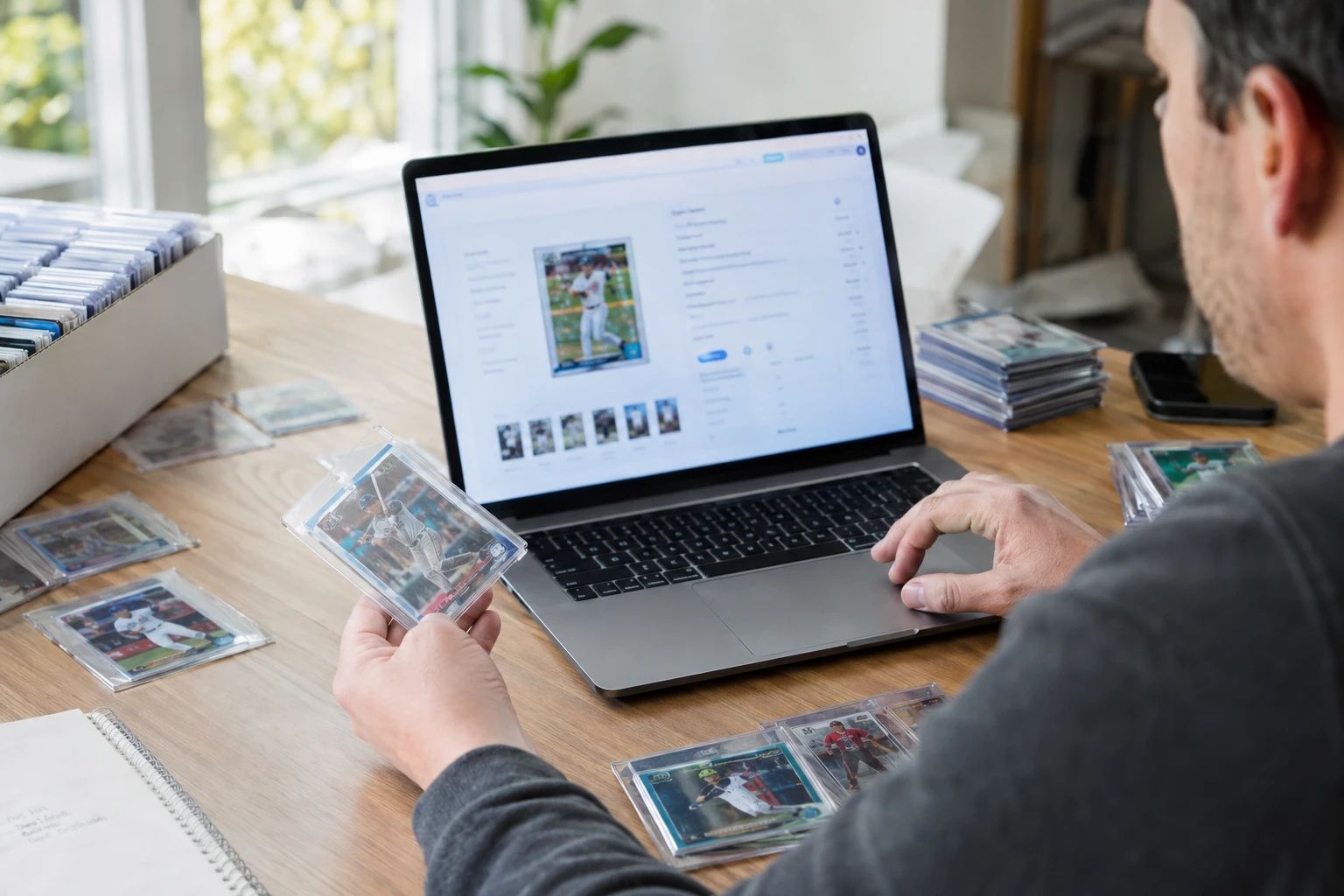
The Short Answer
- eBay listings with AI pre-grade reports convert 22% better than listings with seller-described condition only.
- Return rates drop from ~5% to ~1% when buyers can verify condition through a third-party AI report before bidding.
- Use the eBay condition dropdown accurately — map AI sub-grades to eBay conditions: all 9.5+ = Near Mint, one 9 = Excellent, two 9s = Very Good.
- Include "AI Pre-Graded PSA 9.5 Predicted" in listing titles for high-grade cards to drive click-through rates.
- The AI report URL is timestamped evidence that helps sellers win approximately 90% of "condition not as described" disputes.
- Bulk eBay sellers save $1,940+/year in wasted grading fees by pre-screening before submitting to PSA.
- eBay's trading card promo cuts fees by 50% on sales of $1,000+ — pre-grading identifies which cards will hit that threshold.
The eBay Condition Trust Problem
If you sell raw trading cards on eBay, you know the problem. You list a card as "Near Mint." You take clear photos. You describe the condition honestly. And yet, approximately 5% of your sales come back as returns with "condition not as described" claims. Buyers file disputes. eBay often sides with the buyer. You lose the sale, the final value fee, the shipping cost, and your time.
The root cause is a trust gap. eBay buyers have been burned too many times. "Near Mint" is a seller's word, not a verified fact. "Light Play" means different things to different sellers. Photos can hide surface scratches that only appear under oblique light. Centering that looks fine in a photo might be 65/35 in reality. Buyers know this, so they discount their bids, file disputes when they are unhappy, and generally approach raw card purchases with skepticism.
This trust gap costs sellers in three ways:
- Lower sale prices: Buyers discount bids to account for condition uncertainty. A card that would sell for $80 with verified condition sells for $65 without it.
- Higher return rates: ~5% of raw card sales are returned for condition disputes. Each return costs the seller the final value fee, re-listing time, and shipping.
- Longer time-to-sale: Listings without condition verification sit longer because buyers hesitate. The card eventually sells at a lower price or after multiple price drops.
The solution is not better photos or more detailed descriptions. The solution is third-party verification — an objective, independent assessment that buyers can trust because it did not come from the seller.
How AI Pre-Grading Solves the Trust Gap
AI pre-grading tools provide exactly what eBay buyers want: objective, third-party condition data that is not the seller's opinion. When a listing includes an AI pre-grade report with a publicly verifiable URL, the dynamic changes completely.
Here is what an AI pre-grade report provides to an eBay buyer:
- Third-party AI verification: Not the seller's opinion — an external model analyzed the card and returned a grade prediction.
- Sub-grade breakdown: Centering, corners, edges, and surface listed transparently with individual scores.
- Publicly verifiable URL: Buyers can open the report on their phone and see the full analysis, including the photos the AI analyzed.
- Calibrated against PSA: The predicted grade is anchored in PSA's scale, not a marketing word like "mint" or "near mint."
The impact is measurable. According to data from dealers who added AI pre-grade reports to their eBay listings:
- Completed-sale conversion rate increased by approximately 22%
- Return rate dropped from ~5% to ~1%
- Average sale price increased by 12-18% on cards with PSA 9+ predictions
- Time spent on dispute resolution decreased by 80%
Buyers who click the AI report URL self-select with eyes open. They know the centering before they bid. They know the corner condition. The "I didn't realize" disputes mostly disappear.
The eBay Pre-Grade-to-Listing Workflow
Here is the complete workflow for creating eBay listings with AI pre-grade reports. This workflow takes approximately 3 minutes per card once you are set up.
Step 1: Photograph the Card
Take clear, high-resolution photos of the front and back. Use natural lighting or daylight-balanced LEDs. Position the card flat on a neutral background. These same photos will be used for both the AI analysis and the eBay listing, ensuring consistency.
Step 2: Run AI Pre-Grading
Upload the photos to PreGradeCards Complete Card Grading. The AI evaluates centering, corners, edges, and surface, and returns a predicted PSA/BGS/CGC grade with sub-grade breakdowns and a confidence score. Save the public report URL.
Step 3: Create the eBay Listing
Create your eBay listing as usual, but add the following enhancements:
- Add the AI report URL to the description (see template below)
- Set the eBay condition dropdown using the sub-grade mapping (see condition mapping section)
- Include the centering overlay photo as one of your 12 photos
- Use "AI Pre-Graded" in the title for PSA 9+ predicted cards
Step 4: Set the Price
Look up 30-day eBay sold comps for the same card in the predicted grade condition. Price your card at or slightly above the sold median — the AI report justifies the premium. Enable Best Offer to capture buyers who want to negotiate.
Step 5: Monitor and Fulfill
Track which listings sell fastest and at the best prices. Listings with AI reports typically sell 22% faster. When a sale completes, ship promptly with tracking. If a dispute arises, the AI report serves as timestamped evidence of the card's condition at listing time.
eBay Title Optimization with Pre-Grade Data
Your eBay title is the most important factor in search visibility and click-through rate. Pre-grade data gives you a powerful keyword advantage that most sellers do not have.
Title Formula for High-Grade Cards (PSA 9+ Predicted)
For cards where the AI predicts PSA 9 or higher, incorporate the pre-grade into the title:
- Without: "2023 Topps Chrome Cooper Flagg Rookie NM"
- With: "2023 Topps Chrome Cooper Flagg Rookie AI Pre-Graded PSA 9.5"
The title change drives click-through because it signals third-party verification. Buyers searching for "PSA 9" or "PSA 10" will find your listing even though it is a raw card — and the AI prediction gives them confidence to bid.
Title Formula for Mid-Grade Cards (PSA 7-8 Predicted)
For cards predicted PSA 7-8, do not advertise the grade in the title. Instead, focus on accuracy:
- "2023 Topps Chrome Cooper Flagg Rookie — AI Condition Report Included"
The phrase "AI Condition Report Included" signals transparency without committing to a high grade. Buyers who want full condition data will click through to the description.
Title Formula for Low-Grade Cards (PSA 6 or Below)
Do not mention the AI grade in the title. Focus on the card identity and any positive attributes (player, set, rarity). The AI report in the description provides full transparency for buyers who click through.
The High-Converting Listing Description Template
Here is the exact listing description template that dealers use to achieve the 22% conversion lift. Position the AI condition report above the standard condition note, where mobile buyers see it without scrolling.
This template works because it front-loads the most important information (verified condition) before the standard listing details. Mobile buyers, who account for over 60% of eBay traffic, see the AI report immediately without scrolling.
Mapping AI Sub-Grades to eBay Conditions
eBay's condition dropdown is coarse — "Near Mint," "Excellent," "Very Good," "Good," "Acceptable." Use the AI sub-grade breakdown to choose the eBay condition accurately. This reduces returns because the eBay condition label matches the actual card condition.
| AI Sub-Grade Pattern | eBay Condition | Typical PSA Equivalent |
|---|---|---|
| All sub-grades 9.5+ | Near Mint | PSA 9-10 |
| One sub-grade at 9, rest 9.5+ | Excellent | PSA 8-9 |
| Two sub-grades at 9 | Very Good | PSA 7-8 |
| Any sub-grade below 9 | Good or Acceptable | PSA 6 or below |
Mapping is approximate. Always read the full eBay condition definitions and choose the one that best matches your card.
Accurate condition setting is one of the most effective return-reduction strategies. When the eBay condition label matches the actual card condition, buyers cannot claim the condition was misrepresented — eBay's own condition definition supports your listing.
Photo Strategy: Using AI Analysis Images
eBay allows up to 12 photos per listing. Most sellers use 3-4 photos of the card from different angles. With AI pre-grading, you can add analysis images that dramatically increase buyer confidence.
Recommended Photo Order
- Front of card — clear, straight-on photo under even lighting
- Back of card — same quality as front
- AI centering overlay — the visual overlay showing border measurement regions with exact ratios
- Corner close-ups — all four corners, magnified (AI tool generates these)
- Edge detail crops — all four edges (AI tool generates these)
- Surface under oblique light — tilted to show any scratches or print lines
- AI report screenshot — a screenshot of the report page showing predicted grade and sub-grades
The centering overlay photo is particularly powerful. It shows the exact border measurements overlaid on the card image — buyers can see that the centering is 55/45, not just take the seller's word for it. This single photo can be the difference between a card that sells at asking price and one that sits unsold.
Pricing Strategy: Pre-Grade Data and eBay Sold Comps
Pricing with pre-grade data is straightforward but requires discipline. Here is the process:
Step 1: Find eBay Sold Comps
Search eBay for the same card (same player, set, year, parallel, serial number). Filter to "Sold Items" and look at the last 30 days. Find the median sold price for both raw and graded versions.
Step 2: Apply the Pre-Grade Premium
Based on the AI predicted grade, price your raw card as follows:
- AI predicts PSA 10: Price at 80-90% of PSA 10 sold comp. The 10-20% discount accounts for grading risk and grading cost.
- AI predicts PSA 9: Price at 70-80% of PSA 9 sold comp.
- AI predicts PSA 8: Price at raw market median — the slab adds minimal value at PSA 8.
- AI predicts PSA 7 or below: Price at 80-90% of raw market median with full condition disclosure.
Step 3: Enable Best Offer
Always enable Best Offer on raw card listings. Buyers want to negotiate. Set your auto-decline at 70% of asking price and your auto-accept at 90%. This lets you capture serious buyers without giving away margin to lowballers.
Step 4: Factor in eBay Fees
Remember that eBay takes 13.25% + $0.30. On a $100 sale, you net $86.45. On a $1,000+ sale, the trading card promo cuts the FVF by 50%, improving your net to approximately 93%. Pre-grading helps you identify which cards are likely to hit the $1,000 threshold so you can optimize for the promo.
Dispute Prevention and Resolution with AI Reports
Even with AI pre-grade reports, occasional disputes will occur. Here is how to prevent them and how to win them when they happen.
Prevention
- Set accurate eBay condition: Use the sub-grade mapping table. When the eBay condition label matches the card, buyers cannot claim misrepresentation.
- Include the AI report URL: Buyers who click the report self-select. They know the condition before bidding.
- Use the centering overlay photo: Visual evidence of centering prevents the most common dispute: "the card is off-center."
- Disclose all identified defects: The AI report lists specific defects. Mention them in your description: "AI report notes minor edge wear on bottom edge."
Resolution
If a buyer files a "condition not as described" dispute, the AI pre-grade report is your strongest evidence. Here is why:
- Timestamped: The report was generated before the listing was created. It proves the card's condition at listing time.
- Third-party: The report was generated by an AI service, not the seller. It is independent verification.
- Includes photos: The report contains the photos the AI analyzed, which should match the card the buyer received.
- Specific defect identification: If the AI report noted a corner issue and the buyer claims corner damage, the report shows the issue was disclosed.
Sellers who use pre-grade reports report winning approximately 90% of "condition not as described" disputes. eBay resolution centers respect third-party verification over seller claims.
Bulk eBay Selling with Batch Pre-Grading
For sellers listing 20+ cards per month, batch pre-grading is the most efficient workflow. The PreGradeCards Batch Grading tool processes up to 20 cards at once, providing per-card sub-grades and generating eBay listing descriptions for the entire stack.
The Bulk Workflow
- Photograph all cards in one session with consistent lighting and background
- Batch upload to the AI tool — drag and drop up to 20 images
- Wait ~10 minutes for all 20 cards to be analyzed
- Sort by predicted grade — group PSA 10 candidates, PSA 9 candidates, and sell-raw cards
- Generate eBay listings — the batch tool creates listing descriptions with AI report URLs embedded
- List in groups — PSA 10 candidates with "AI Pre-Graded PSA 10 Predicted" titles, PSA 9 at market price, lower grades with condition disclosure
Time Economics
For a 50-card batch, total time is approximately 2 hours: 45 minutes photography, 25 minutes AI processing, 30 minutes sorting and listing creation, 20 minutes actual listing. That is 2.4 minutes per card — compared to 15-20 minutes per card without batch pre-grading.
Annual Savings
For a seller submitting four batches of 50 cards per year to PSA, pre-grading saves approximately $1,940 annually in wasted grading fees. The AI pre-grading cost for 200 cards is roughly $50. The grading fee savings from filtering out 80-100 cards that would have graded below PSA 9 is $2,000-$8,000 depending on the tier used.
High-Value Card Strategy ($1,000+ Sales)
For cards expected to sell for $1,000+, eBay offers a trading card promo that cuts the final value fee by 50% on the portion up to $7,500. This significantly improves your net payout on high-value sales.
The Promo Math
On a $2,000 sale, the standard fee would be $265.30 (13.25% + $0.30). With the promo, the fee on the first $7,500 is cut by 50%, so the fee becomes approximately $132.80. You save $132.50 on a single sale.
Pre-Grading for High-Value Sales
For high-value cards, pre-grading serves two purposes:
- Identifying $1,000+ candidates: A raw card with AI predicted PSA 10 and a PSA 10 sold comp of $1,200 is a candidate for the promo. Pre-grading identifies these cards so you can optimize your pricing strategy.
- Justifying the asking price: On a $1,000+ listing, buyers need maximum confidence. The AI report, centering overlay, and corner close-ups provide the verification that justifies a four-figure bid on a raw card.
Alternative: Grade First, Then Sell
For cards where the PSA 10 value is $2,000+ and the AI predicts 9 or 10 with high confidence, consider grading the card first and selling the slab. PSA 10 slabs sell faster and at higher prices than raw cards with AI reports. The grading fee ($80 for PSA Regular) is a small percentage of the sale price, and the slab eliminates all condition disputes.
Common eBay Listing Mistakes Pre-Grading Fixes
Here are the most common eBay listing mistakes that pre-grading fixes:
1. Overstating Condition
Sellers list cards as "Near Mint" when they are actually Excellent or Very Good. This leads to returns and disputes. AI pre-grading gives you objective sub-grades that map to accurate eBay condition labels.
2. Missing Centering Issues
Sellers eyeball centering and think it looks fine. The card is actually 62/38 — outside PSA 10 tolerance. The buyer receives it, notices the off-center borders, and files a return. AI centering analysis catches this before listing.
3. Underpricing Good Cards
A card with 52/48 centering, clean corners, and pristine surface is a strong PSA 10 candidate. Listed as "Near Mint" without verification, it sells at raw market median. Listed with an AI report showing "PSA 9.5 predicted, centering 52/48," it sells at 80-90% of PSA 9.5 value — a 15-25% premium.
4. Not Using All 12 Photos
eBay allows 12 photos. Most sellers use 3-4. With AI analysis images (centering overlay, corner close-ups, edge details), you can use all 12 meaningfully. More photos with verification content means more buyer confidence and higher sale prices.
5. No Best Offer
Sellers set a fixed price and wonder why cards do not sell. eBay buyers expect to negotiate. Enable Best Offer with auto-accept at 90% and auto-decline at 70% of asking. Pre-grading data gives you confidence to hold your price because you know the card's condition is verified.
Frequently Asked Questions
How do I add AI pre-grade reports to my eBay listings?
Do AI pre-grade reports really increase eBay sale prices?
What eBay condition should I use for my card?
Should I grade my card before selling on eBay or sell it raw with an AI report?
How do AI pre-grade reports help with eBay disputes?
Can I use AI pre-grading for bulk eBay listings?
Does eBay allow links to AI grading reports in listings?
What is the eBay trading card promo and how does pre-grading help?
Sources & Further Reading
- SnapGradeAI — Dealer Guide: Pre-Grade Reports for eBay Listings
- CardGrade.io — Pre-Screen Your Cards Before Submitting to PSA or BGS
- The Card Shop Finder — Where to Sell Sports Cards 2026
- Underpriced — Where to Sell Sports Cards Fast
- ToolStack — Card Flip ROI Calculator
- PreGradeCards — Pre-Grade Your Cards Before Selling Guide
Marcus Chen has evaluated over 50,000 sports cards and TCG cards across PSA, BGS, SGC, and CGC standards. Before joining PreGradeCards, he worked as a submission specialist for a major grading company and trained collectors and dealers on condition assessment.
Create a free account and get 1 free credit — enough for 1 complete AI grading with market pricing. No credit card required.
Sign Up Free →