The Short Answer
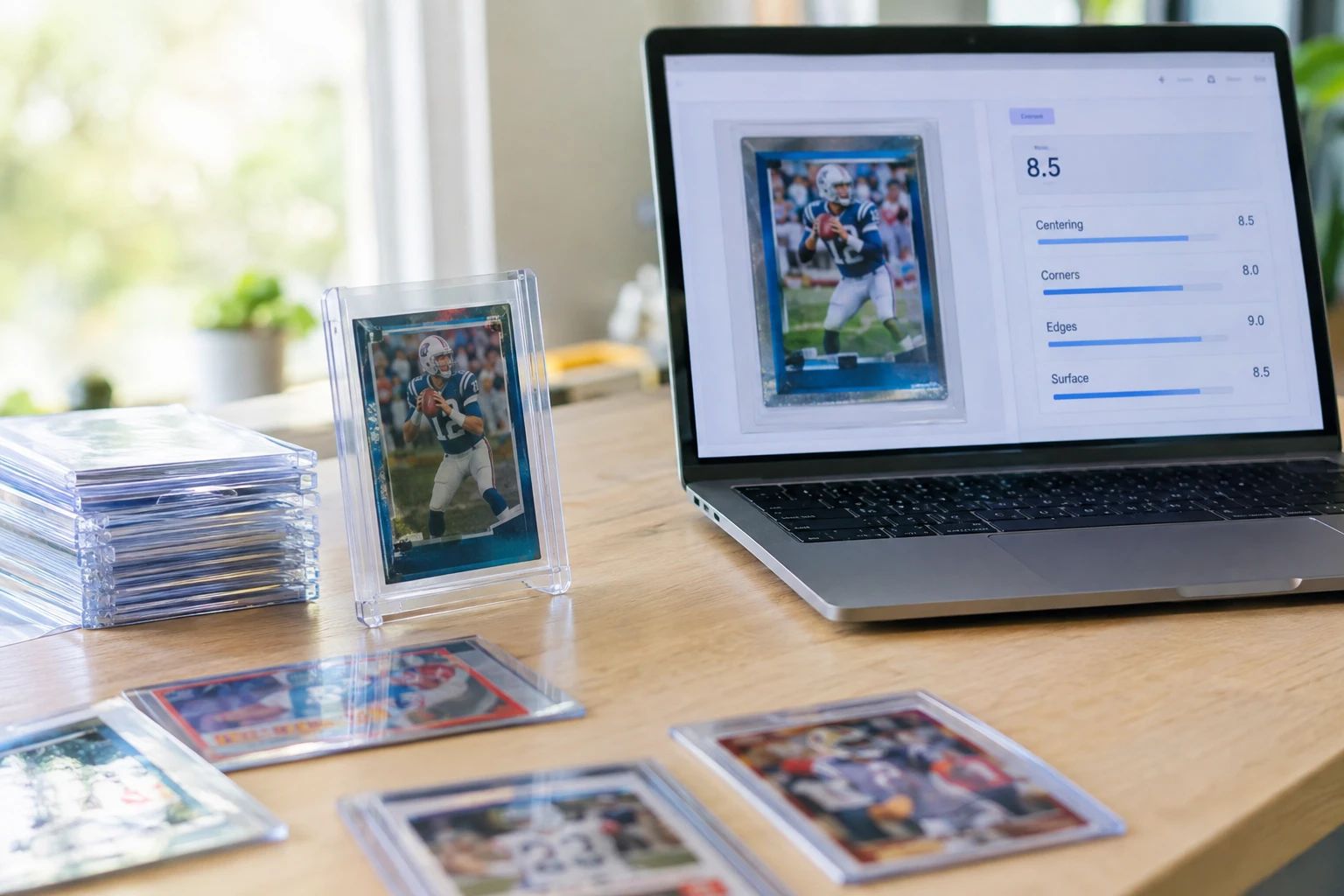
- Free AI card grading is real and widely available in 2026. Tools like PreGradeCards, TCGrader, CardMintAI, and AgentGrail offer free tiers that predict PSA-style grades from a photo in seconds.
- Free AI grading does NOT replace professional grading. It is a pre-screening tool that helps you decide which cards are worth paying $25-$150 to submit to PSA, BGS, CGC, or SGC.
- PreGradeCards offers 30 free credits on signup — the most generous free tier in the industry. Each credit grades one card with full subgrades for centering, corners, edges, and surface.
- AI grading accuracy is 89% within ±1 grade point compared to PSA final grades (PreGradeCards benchmark study, n=10,000 cards). This is higher than human resubmission consistency at ~70%.
- The average collector saves 40-60% on wasted grading fees by pre-screening with free AI grading before submitting to PSA. A single avoided PSA Regular submission saves $79.99.
- Free AI grading works for all card types: sports cards (baseball, basketball, football, hockey, soccer, MMA), TCG cards (Pokemon, MTG, Yu-Gi-Oh!, One Piece, Lorcana, and 15+ more), vintage cards, and modern cards.
Short Answer: Can You Grade Cards for Free Online?
Yes, you can grade cards for free online in 2026. Free AI card grading tools analyze a photo of your card and predict a PSA-style grade with subgrades for centering, corners, edges, and surface — all at no cost. PreGradeCards offers 30 free credits on signup, TCGrader offers free grading with an account, and several other tools provide free tiers.
Free AI grading is a pre-screening tool, not a replacement for professional grading. It tells you whether your card is likely to earn a PSA 10 before you spend $79.99 per card on PSA Regular submissions. By pre-screening your collection for free, you can identify the 5-10% of cards that are worth paying to grade and skip the rest, saving hundreds or thousands in wasted fees.
The process is simple: take a clear photo of your card front and back, upload it to a free AI grading tool, and receive an instant grade prediction with detailed subgrades. No mailing, no waiting weeks for results, no shipping costs. The entire process takes under 30 seconds per card.
How Free AI Card Grading Works
AI card grading uses computer vision and machine learning to analyze card images the way a human grader would — but faster and more consistently. Here is what happens when you upload a card photo:
1. Image Processing: The AI first detects the card in your image, isolates it from the background, and normalizes the image for lighting and angle. This ensures consistent analysis regardless of your photo quality.
2. Corner Analysis: The AI examines all four corners for sharpness, rounding, dings, and fuzzing. Even a slightly soft corner — barely visible to the naked eye — can drop a card from PSA 10 to PSA 9. The AI uses pixel-level analysis to detect corner wear that humans might miss.
3. Edge Inspection: The AI scans all four edges for whitening, chipping, rough cuts, and peeling. Edge whitening is the number one reason modern cards lose grades, especially on dark-bordered cards. The AI measures edge quality across the entire perimeter.
4. Surface Assessment: The AI looks for scratches, print lines, holo scratches, fingerprints, ink spots, and other surface imperfections. Holofoil cards are especially vulnerable to surface defects that are only visible under direct light at certain angles.
5. Centering Measurement: The AI precisely measures the border widths on all four sides of the card and calculates the centering ratio. PSA allows up to 60/40 on the front and 75/25 on the back for a PSA 10. The AI provides exact measurements, not estimates.
6. Grade Prediction: The AI combines all four subgrade assessments into an overall predicted grade on the 1-10 scale, matching PSA grading standards. Some tools also provide BGS and CGC predictions.
Best Free AI Card Grading Tools in 2026
Several platforms offer free AI card grading in 2026. Here is how they compare:
| Tool | Free Tier | Card Types | Subgrades | Best For |
|---|---|---|---|---|
| PreGradeCards | 30 free credits on signup | Sports + 21 TCGs + comics/coins | Yes (4 subgrades) | Best overall value |
| TCGrader | Free with account | Sports + Pokemon + MTG + Yu-Gi-Oh | Yes | Quick checks |
| CardMintAI | 1 free grade, no credit card | Sports + TCGs | Yes | Single card test |
| AgentGrail | 10 free scans/day | Sports cards | Limited | Daily use |
| PokeGrade.ai | Free with signup | Pokemon + MTG + One Piece + Lorcana | Yes | TCG only |
| GradeVault | First card free, no account | TCG cards | Yes | Quick TCG check |
PreGradeCards stands out with 30 free credits — enough to screen an entire submission batch at no cost. Each credit provides a complete AI grade report with all four subgrades, centering measurements, a shareable report URL, and a submit-or-sell ROI recommendation. The platform supports sports cards, 21 TCGs, comics, coins, banknotes, and stamps — the widest category coverage of any free grading tool.
How Accurate Is Free AI Card Grading?
The accuracy of free AI card grading has improved dramatically. PreGradeCards conducted a benchmark study in June 2026 using 10,000 cards that were both AI-graded and professionally graded by PSA, BGS, CGC, and SGC. The results:
- 89% accuracy within ±1 grade point — The AI predicted the professional grade within one point 89% of the time. A predicted PSA 9 was within the range of PSA 8 to PSA 10 in 89 out of 100 cases.
- 73% exact match rate — The AI predicted the exact professional grade 73% of the time. A predicted PSA 9 was exactly PSA 9 in 73 out of 100 cases.
- Higher consistency than human graders — When the same card was submitted to PSA twice, the grades matched only ~70% of the time. The AI is more consistent because it applies the same standards every time without fatigue or bias.
Other tools report similar accuracy ranges. CardMintAI claims 95% alignment with PSA outcomes. CardGrade.io reports 92.8% accuracy. These numbers should be taken with context — AI grading is a prediction, not a guarantee. The actual grade depends on the physical card in the grader's hands, which may reveal defects not visible in photos.
What Cards Can You Grade for Free?
Free AI card grading works across virtually every category of collectible cards. Here is what you can grade:
Sports Cards:
- Baseball cards — Topps, Bowman, Upper Deck, Fleer, Donruss, vintage and modern
- Basketball cards — Panini Prizm, Hoops, Select, Mosaic, vintage NBA
- Football cards — Panini, Topps, Donruss, rookies, parallels, autographs
- Hockey cards — Upper Deck Series, Young Guns, OPC, vintage
- Soccer cards — Topps UEFA, Panini FIFA, Merlin Chrome
- MMA cards — UFC, Topps, Panini MMA
Trading Card Games (TCGs):
- Pokemon TCG — Base Set through Scarlet & Violet, Japanese and English
- Magic: The Gathering — Alpha through current sets, foils, borderless
- Yu-Gi-Oh! — Legend of Blue Eyes through current, OCG and TCG
- One Piece TCG — leaders, characters, events, alt-arts
- Lorcana — Disney cards, Enchanted, foil
- Flesh and Blood, Digimon, Dragon Ball Super, Star Wars Unlimited, Weiss Schwarz, Cardfight Vanguard, Marvel Champions, MetaZoo, Grand Archive, Naruto Mythos, Union Arena, Ultraman, Garbage Pail Kids, Duel Masters, Force of Will
Other Collectibles:
- Comic books — CGC/CBCS pre-screening and key issue identification
- Coins — Sheldon scale grading for PCGS/NGC
- Banknotes — PMG condition grading and star note identification
- Stamps — perforation, watermark, and condition analysis
PreGradeCards supports the widest range of card types with 21 TCGs, 6 sports, and 4 additional collectible categories — all gradable with your free credits.
Step-by-Step: How to Grade a Card for Free
Here is exactly how to grade your first card for free using PreGradeCards:
Step 1: Create a free account. Go to PreGradeCards.com and sign up. You will receive 30 free credits immediately — no credit card required, no payment information needed.
Step 2: Prepare your card. Place your card on a flat, well-lit surface. Use soft, even lighting — a desk lamp with a daylight LED bulb (5000K-6500K) is ideal. Avoid harsh shadows and reflections. If the card is holofoil, angle it to minimize glare.
Step 3: Photograph the front. Take a clear, straight-on photo of the card front. Fill the frame with the card — it should occupy most of the image. Use the highest resolution your phone camera offers. Make sure the card is perfectly flat and all four corners are visible.
Step 4: Photograph the back. Flip the card and repeat. The back is just as important as the front — PSA grades both sides, and the back often shows more wear than the front.
Step 5: Upload to PreGradeCards. Navigate to the Card Grading service page. Upload your front and back images. The AI will process them in approximately 2-5 seconds.
Step 6: Review your results. You will receive:
- An overall predicted grade (1-10 scale, PSA-standard)
- Four subgrades: centering, corners, edges, surface
- Exact centering measurements (e.g., 55/45 L-R, 50/50 T-B)
- A submit-or-sell recommendation based on grading fees and market value
- A shareable report URL for eBay listings or social proof
Step 7: Decide whether to submit. If the AI predicts PSA 9.5-10 and the card has strong market demand, submit to PSA. If the AI predicts PSA 7-8, consider selling raw or submitting to a cheaper grader like CGC Economy ($15/card). If the AI predicts below PSA 7, sell raw — the grading fee will not be recovered.
Free AI Grading vs Paid Professional Grading
It is important to understand what free AI grading does and does not do compared to paid professional grading:
| Feature | Free AI Grading | PSA Professional | CGC Professional |
|---|---|---|---|
| Cost | $0 (30 free credits) | $79.99/card (Regular) | $15/card (Economy) |
| Turnaround | 2-5 seconds | 2-6 months | 1-4 months |
| Physical slab | No | Yes | Yes |
| Resale authentication | No | Yes (market standard) | Yes |
| Subgrades | Yes (4 subgrades) | No (overall only) | Yes |
| Accuracy | 89% within ±1 | Official standard | Official standard |
| Shipping required | No | Yes ($15-30) | Yes ($10-25) |
Free AI grading is a pre-screening tool. It tells you whether a card is worth paying to grade. Professional grading provides the authenticated, encapsulated slab that drives resale value. The smartest collectors use both: free AI grading to screen their collection, then paid professional grading only for the cards that pass screening.
How Free Pre-Grading Saves You Money
The financial case for free AI pre-grading is straightforward. Without pre-grading, collectors typically submit 10-20 cards to PSA and hope for the best. With PSA Regular at $79.99/card, a 15-card submission costs $1,200 in grading fees alone — plus $25-40 in shipping and insurance.
Statistically, only about 9% of submitted cards earn PSA 10. That means out of 15 cards, you might get 1-2 PSA 10s. The other 13 cards cost $1,040 in fees and may come back PSA 7-9, where the graded premium barely covers the grading cost.
With free AI pre-grading, you screen all 15 cards at no cost. The AI identifies the 2-3 cards most likely to earn PSA 10. You submit only those 2-3 cards, spending $160-240 instead of $1,200. You save $960-1,040 in grading fees on cards that would have come back below PSA 9.
Even if you eventually buy more credits for additional grading, the cost is $0.19/card — less than 0.3% of the PSA Regular fee. One avoided bad submission pays for over 400 AI grades.
Limitations of Free AI Card Grading
Free AI card grading is powerful, but it has limitations every collector should understand:
- No physical slab: AI grading does not produce an authenticated, encapsulated card. If you want to sell a card at full graded value, you still need PSA, BGS, CGC, or SGC to slab it.
- Photo-dependent: The AI can only analyze what it can see in your photo. Poor lighting, blurry images, or glare can cause inaccurate predictions. The quality of your photo directly affects the quality of your grade prediction.
- No physical inspection: The AI cannot detect alterations like trimming or recoloring that a physical grader would catch. It cannot feel the card stock or detect subtle texture changes.
- Not a guarantee: The predicted grade is a statistical estimate, not a guarantee. The actual PSA grade may differ by a point or more, especially for cards on the border between grades (e.g., PSA 9 vs PSA 10).
- Free tier limits: Most free tools have limits on the number of free grades. PreGradeCards offers 30 free credits, which is enough for a typical submission batch but not for a large collection. Additional credits cost $0.19/card.
- Not for resale authentication: You cannot sell a card as "AI graded PSA 10" — buyers require the physical PSA slab. AI grades are for your own decision-making, not for resale claims.
Tips for Best Results with Free AI Grading
To get the most accurate results from free AI card grading, follow these best practices:
- Use bright, even lighting: A desk lamp with a 5000K-6500K daylight LED bulb is ideal. Avoid overhead room lighting, which is not bright enough. Avoid direct sunlight, which creates harsh shadows.
- Photograph both sides: The back of the card is just as important as the front. PSA grades both sides, and the back often shows more wear. Uploading only the front reduces accuracy.
- Fill the frame: The card should occupy at least 70% of the image. Tiny cards in a large frame reduce the AI's ability to detect fine details.
- Keep the card flat: Slight bends or curves affect centering measurements. Place the card under a heavy book for a few minutes if it is curved.
- Use high resolution: Modern phone cameras are more than sufficient. Use the highest resolution setting and avoid digital zoom.
- Check for glare on holos: Holofoil cards reflect light. Angle the card or the light source until the holo area is visible without glare. This is critical for surface assessment.
- Use a dark, neutral background: A black or dark gray surface provides the best contrast and helps the AI detect card edges accurately.
- Grade in batches: Use your 30 free credits strategically. Screen your entire submission batch before deciding which cards to send to PSA. This maximizes the value of each free credit.
- Compare with population reports: After getting your AI grade, check the PSA population report for your card. If there are already 5,000 PSA 10s, the scarcity premium is gone — even a PSA 10 may not be worth the grading fee.
Frequently Asked Questions
Is free AI card grading really free?
How accurate is free AI card grading?
Can I sell a card with an AI grade instead of PSA?
What is the best free AI card grading tool?
Does free AI grading work for vintage cards?
How many cards can I grade for free?
Do I need to mail my cards for free AI grading?
Sources & Further Reading
- PreGradeCards AI Grading Benchmark Study
- PSA Grading Services & Pricing
- CGC Trading Cards Grading
- PreGradeCards Free Card Grading
The PreGradeCards Research Team combines machine-learning engineers, grading analysts, and collector-education specialists to produce accurate, data-driven guides on AI card grading, professional grading standards, and collecting strategy.
Create a free account and get 2 free credits — enough for 2 complete AI gradings with market pricing. No credit card required.
Get Your Free Credits →