The Short Answer
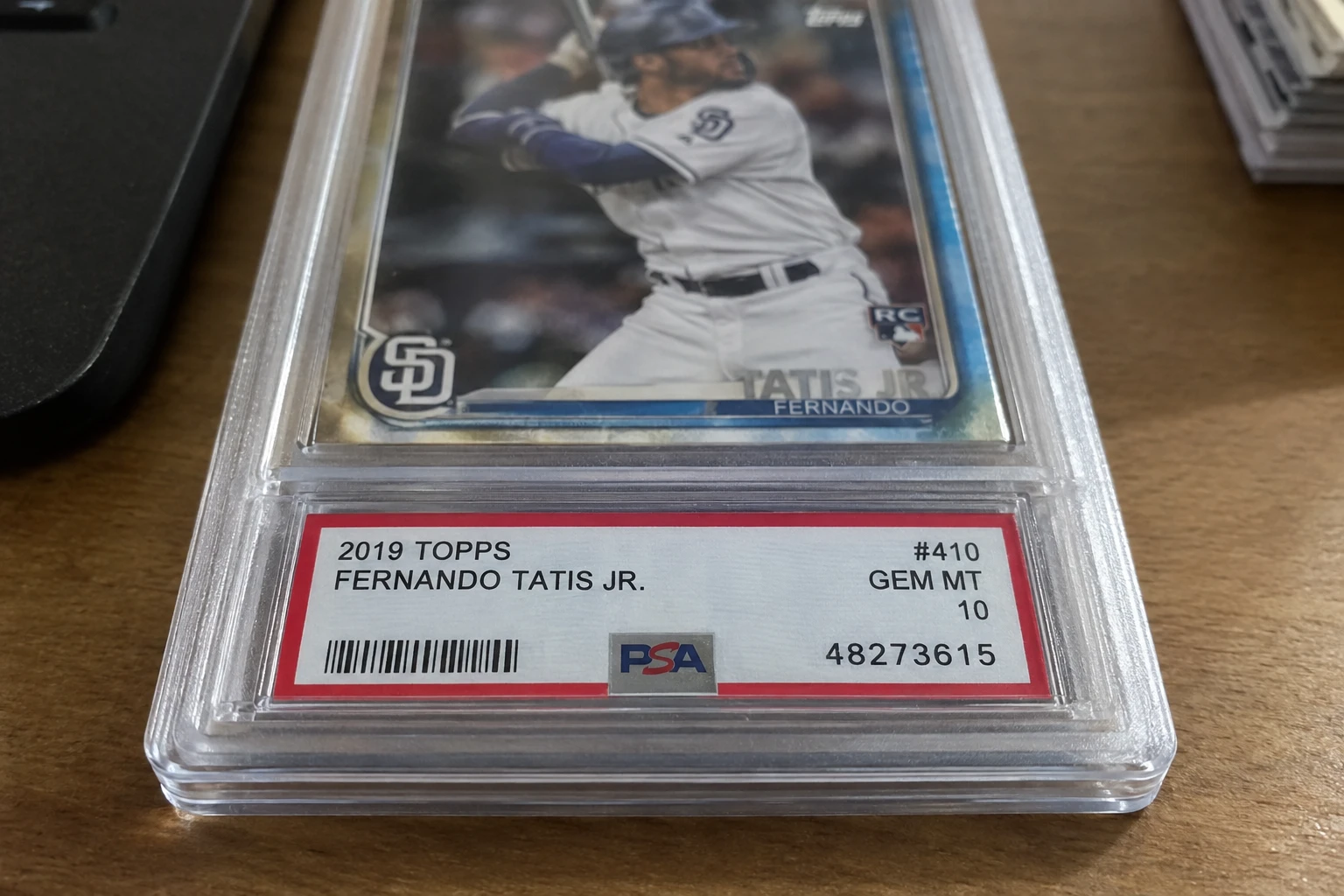
- The cert number sits bottom-right of the front label (8-10 digits) and repeats on the reverse in a barcode — newer slabs also carry a QR code on the back.
- Three ways to verify: psacard.com/cert, the URL form psacard.com/cert/NUMBER, or the PSA app's camera scan.
- Match every field, not just the player — year, set, card number, and grade all have to line up with the slab in your hand.
- A clean lookup proves the number exists — not that your label is the one it belongs to. Counterfeiters print real cert numbers onto fake inserts.
- 'Private set registry' isn't an error — it means a collector claimed that cert in PSA's Registry; the card is still real.
- Physical checks matter as much as the database: hologram quality, font, label stock, and slab seam are what catch a fake wearing a real number.
What the PSA Certification Number Is
Every card, ticket, pack, or autograph PSA certifies gets a unique certification number — typically 8-10 digits — that serves as its permanent record in PSA's database. Think of it as the slab's serial number: one number, one item, permanently linked. PSA's public cert lookup lets anyone query that database for free, which makes it the first line of defense when buying graded cards online or in person.
The cert number is more than a fraud check, though. Pulling up the record also confirms the population data — how many copies of that card exist at each grade — which feeds directly into valuation. A PSA 10 that's 1 of 40 at grade is a different asset than a PSA 10 that's 1 of 4,000, and the cert record is the authoritative source. (Our own population report tools let you dig deeper into pop dynamics across sets and players.)
Where the Cert Number Sits on the Slab
| Location | What You'll Find |
|---|---|
| Front label, lower right | The cert number printed in black type — the primary placement on every modern PSA label. |
| Reverse label, white bar | Since December 2015, the same number and its barcode repeat on the back, beneath the embedded PSA holograms. |
| QR code (newer slabs) | Recent-generation labels carry a scannable QR on the reverse that links straight to the database record. |
| PSA/DNA autograph items | A half-inch oval tamper-evident sticker with a six-digit alphanumeric cert — different format, same lookup. |
One detail worth noting: the cert number is on the label, not the card. If you're handed a slab where the label number doesn't match the number on the reverse barcode, walk away — that mismatch is a hallmark of a tampered holder.
Three Ways to Look Up a PSA Cert Number
1. The web tool. Go to psacard.com/cert and type the number in. It's free, no login required, and returns the database record immediately. This is the method everyone means when they say cert lookup.
2. The direct URL. PSA resolves records at psacard.com/cert/NUMBER — paste the cert number onto the end of that URL and the record loads directly. Handy for linking someone to proof in a marketplace conversation, or for a buyer who wants to verify your listing without retyping.
3. The PSA app. Open the app, tap Scan a Card, and point the camera at the label's barcode (or the QR code on newer slabs). The app pulls the record without any typing — which also eliminates the most common lookup failure: a transposed digit returning a panic-inducing no record found.
Whichever method you use, treat the lookup as step one of verification, not the whole process — the next sections cover what the result actually proves.
Reading the Result Page — Field by Field
A clean lookup returns the item's database record. Here's what each field should match against the physical slab:
| Record Field | What to Check |
|---|---|
| Item description | Year, set, card number, player — all four must match exactly. Right player but wrong year or parallel is a red flag, not a detail. |
| Grade | The grade on the record must equal the grade on the label, including any qualifiers (OC, MC, ST, etc.). A label saying 10 where the record says 8 means the label is fake. |
| Certification date | When PSA graded it. A slab claiming to be decades old with a record dated last month deserves scrutiny. |
| Population link | The record ties into pop data — how many exist at this grade and higher. Cross-check against our pop report when valuing. |
| Item images (if present) | PSA images many cards at grading time. If the record shows photos, compare them to your slab pixel-for-pixel — centering, print marks, and edge details are fingerprints. |
The discipline is to read the record against the item, not past it. A match on the player name alone proves nothing — counterfeiters count on buyers stopping there.
The Private Set Registry Message (Not an Error)
You'll eventually hit a record that reads something like this cert is currently in a user's private set registry inventory. That's not an error and it's not a warning — it means a collector has added the card to a private collection in PSA's Set Registry, so the public detail is hidden.
Two things to know: the card is still legitimate (a private registry entry is, if anything, evidence the cert is real and in active use), and the lack of visible detail means you should lean harder on the physical verification steps below rather than treating the obscured record as suspicious.
What a Clean Lookup Proves — and What It Doesn't
This is the part PSA itself warns about, and the part buyers most often skip: a successful lookup proves the number exists in PSA's database. It does not prove the label in your hand is the one that number was issued to.
Counterfeiters pull real cert numbers from public sources — eBay photos, registry listings, forum posts — and print them onto fake inserts inside fake slabs. The lookup comes back clean because the number is real; the slab is still counterfeit. PSA's own cert page carries this warning verbatim, and recommends buying only from verified dealers for exactly this reason.
So the lookup answers does this number exist and does its record match? — necessary, never sufficient. The physical checks below are what close the loop.
The Physical Fake-Slab Checklist
Run this checklist on any high-value purchase — especially when a cert number checks out but something feels off:
| Check | Real Slab | Common Fake Tell |
|---|---|---|
| Holograms | Crisp, embedded PSA hologram strips on the reverse label | Foil stickers pasted on, blurry or wrong-color holograms |
| Label stock & font | Sharp print, correct PSA typeface, consistent color | Fuzzy text, wrong red tone, home-printer look |
| Case seam | Clean sonically-welded edge; case doesn't flex open | Visible glue, pryable seam, cracked and re-glued |
| Front vs back numbers | Cert number on front label matches reverse barcode exactly | Mismatched or missing reverse barcode |
| Lighthouse logo flip | Correct lighthouse/PSA logo orientation per era | Wrong-era label design for the cert date |
| Card inside | Card matches record photos (centering, marks) | Different card, wrong centering, swapped insert |
For a deeper dive on spotting counterfeits, our fake slab identification guide covers era-specific label variants and the current generation's security features in detail.
The Online-Purchase Verification Workflow
For marketplace purchases — eBay, Facebook groups, forum BST threads — fold the cert check into a short routine before money moves. First, pull the cert number from the listing photos (a seller who won't show the label is already a flag) and run it through the lookup. Second, compare the record's item description field-by-field against the listing's claims — year, set, card number, grade. Third, if the record carries PSA's grading-time images, compare them against the seller's photos: centering, print defects, and surface marks are effectively fingerprints, and a card whose front doesn't match its own grading photos is a swapped insert. Fourth, screenshot the record — if a dispute lands later, you want evidence of what the database said on purchase day.
And keep the proportion straight: on a $40 slab this is a five-minute sanity check. On a four-figure grail, it's the start of a longer verification that should include seller history, return protection, and where justified, a resubmission or professional opinion. The lookup is the floor, not the ceiling.
When the Lookup Fails: Troubleshooting No Record Found
A no record found result has several innocent causes before it means fraud — work through them in order:
- Retype it carefully. Transposed digits are the #1 cause. Use the app scan instead of typing when possible.
- Check the number source. Make sure you're reading the cert number, not a different number on the label (older labels have multiple numeric fields).
- Very recent slabs lag. A card graded days ago may not be in the public database yet.
- Very old slabs predate the database. PSA's cert lookup doesn't fully cover the earliest-era certificates — a missing record on a genuinely old slab is ambiguous, not damning.
- PSA/DNA items use a different format — the oval sticker's six-digit alphanumeric. Enter it exactly, including any letters.
After eliminating all five, a missing record on a supposedly recent slab is a serious red flag — pause the purchase and contact PSA directly at 800-325-1121 with the cert number and photos.
Frequently Asked Questions
How do I look up a PSA cert number?
Go to psacard.com/cert and type in the 8-10 digit number from the bottom right of the slab's front label. You can also load psacard.com/cert/NUMBER directly, or scan the label's barcode with the PSA app.
Where is the cert number on a PSA slab?
Bottom right of the front label, printed in black. On slabs graded since December 2015, the same number and its barcode repeat on the reverse in a white bar beneath the holograms; the newest labels add a scannable QR code.
Does a successful cert lookup mean the slab is real?
No — it only proves the number exists in PSA's database. Counterfeiters copy real cert numbers onto fake inserts, so a clean lookup must be backed by physical checks: hologram quality, label font, case seam, and matching front/back numbers.
What does 'in a user's private set registry' mean on a lookup?
A collector has claimed that cert number in PSA's Set Registry and set it private, hiding the public detail. It's not an error or a warning — the cert is real and in active use; just rely more heavily on physical inspection since the record is obscured.
Why does my PSA cert lookup say no record found?
Usually a typo — retype or scan instead. Otherwise: the slab was graded too recently to be in the public DB, it predates the database coverage, or you entered a PSA/DNA alphanumeric incorrectly. Persistent failures on recent slabs are a red flag worth reporting to PSA.
Is the PSA cert lookup free?
Yes — psacard.com/cert is a free public tool with no login required. The PSA app's camera scan is also free.
What's the difference between PSA cert and PSA/DNA cert?
PSA cert covers cards, tickets, packs, and similar items — 8-10 digits on the label. PSA/DNA covers autographs — a six-digit alphanumeric on a half-inch oval tamper-evident sticker. Both verify at the same psacard.com/cert tool.
Can I verify a cert number before buying online?
Absolutely — ask the seller for the cert number (or read it off their photos) and look it up before paying. But remember a clean record doesn't prove their physical slab is the real one: compare any database images to their photos and buy through platforms with buyer protection.
Sources & Further Reading
- PSA Cert Verification Tool
- PSA FAQ — Cert Verification & SecureScan
- PSA Cert Verification Walkthrough
- Cert Lookup Cross-Check Guide

Create a free account and get 1 free credit — enough for 1 complete AI grading with market pricing. No credit card required.
Sign Up Free →