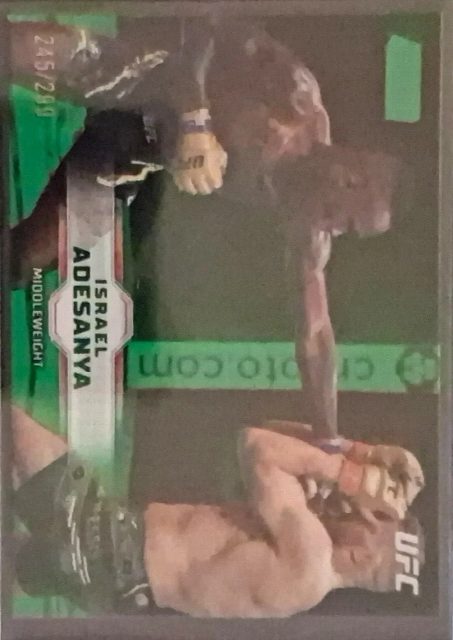
Sport Card · MMA#57Serial #245/299201990% Confidence
CardPlayer & team
Set2019 Chrome Ufc
Card #57
ManufacturerTopps
Year2019
Sub SetGreen
Featuresserial numbered 245/299, Green parallel
BornJul 22, 1989
NationalityNigeria
Age37
PositionFighter
LeagueUFC
Founded1993
CountryInternational
Player Profile
Israel Adesanya
Fighter · Fighting
Israel Mobolaji Temitayo Odunayo Oluwafemi Owolabi Adesanya is a Nigerian-New Zealander professional mixed martial artist, former kickboxer, and boxer. As a mixed martial artist, he currently competes in the Middleweight division of the Ultimate Fighting Championship (UFC), where he is a former two-time UFC Middleweight Champion. In kickboxing, he is a former Glory Middleweight Championship title challenger. As of 24 October 2026, he is #10 in the Meta UFC middleweight rankings.
Corners, edges, surface & centering — powered by computer vision.
Close-up viewSelect any corner or edge on the card to inspect it here, then tap the close-up to zoom in. Tap the middle of the card to see your original photo.
Ecken
8
Near Mint
Kanten
8
Near Mint
Oberfläche
8
Near Mint
Zentrierung
8
Near Mint
Left/Right 42/58Top/Bottom 43/57
🛡︎
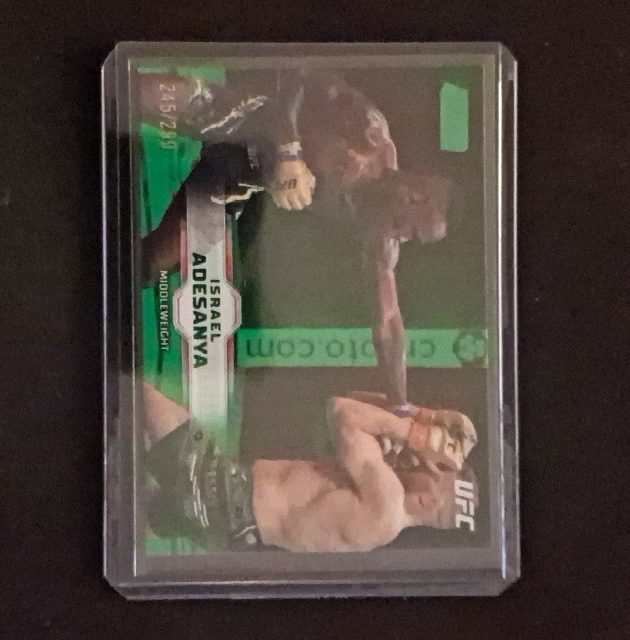
Card photographed inside a rigid holder
Plastic and the case rim hide corner, edge and surface detail, and the holder window can throw off the centering measurement. The grade above is capped at 8 - remove the card from the holder and rescan for a full evaluation.
📷
Photo quality limited this grade
Corners capped at 8 — soft focus (sharpness 2/10) Edges capped at 8 — soft focus (sharpness 2/10) Centering capped at 8 — card inside a rigid holder — rim and plastic hide fine detail
A grade is only as high as the photo can prove. Retake in sharp focus, out of the sleeve, with even light and no glare — the card may grade higher.
Zentrierung is the weakest sub-grade at 8.0. PSA is strict; BGS/CGC moderate. Next concern: Oberfläche 8.0
PreGradeCards
AI-Powered Card Grading Analysis Report
11/11/2026
pregradecards.com
Surface inspection
Surface Lab
Five ways to see why the surface scored what it did — magnify the marks, trace the scratches, rake light across the surface. Open any tool to inspect the card yourself.
Centering Details
8.0
Saved Centering Score
8.0 / 10
Good centering
Centering overlay: green/red guides mark the measured printed borders; labels are the saved measurements.
Border Measurements
Saved L/R Ratio41/59
Saved T/B Ratio44/56
Left24px
Top42px
Right34px
Bottom54px
The card is shifted left horizontally and shifted up vertically relative to the image frame.
Border widths as a fraction of the card's full dimension (0.05 = 5%). Lower = tighter.
Analysis Images
Original Image
Cropped Card
Zentrierungs-Overlay
PGC Slab
📸
Image Quality Analysis
Fair — 72/100
Sleeve/HolderBlurrySerial #245/299
Photo issues
card_in_holder
blurry
Card features detected
Serial numbered: 245/299
Your card is currently inside a rigid protective holder, which creates surface glare and plastic borders that can interfere with inspecting corners, edges, and surface conditions; photographing the card bare on a flat surface allows our card-detection AI to evaluate details directly. Additionally, the photo is noticeably soft, with fine detail appearing smeared. Capturing a sharper, more focused shot under the existing balanced lighting will help ensure corners and surface features—including the stamped serial number (245/299)—are fully clear for the most accurate analysis.
Hybrid Grade Forecast™
Based on our AI sub-grade analysis, here is how we expect this card to perform across major grading companies.
Market data could not be matched to this identification, so pricing has been withheld. 21 marketplace listings were checked against this identification and none matched.
IMAGE MATCH
Listings that look like your card
These listings match your card by image. Tap a card or title to open the listing.
Your photo quality directly affects the AI's ability to read your card accurately. Here are the most common things that can affect your grade — and how to fix them:
🖼️
Use a plain background
Patterned or colorful backgrounds make it harder for the AI to detect your card's true edges. Place your card on a solid white or light-colored surface before photographing.
🃏
Scan raw cards — no sleeves or toploaders
Penny sleeves and toploaders reflect light and blur fine details. The AI can't accurately assess corners, edges, or surface through plastic. Remove all holders before scanning.
🔍
Fill the frame — get close
The more of the image your card occupies, the more detail the AI can see. Small or distant cards lose corner sharpness and surface detail. Crop in so the card fills most of the photo.
💡
Use even, shadow-free lighting
Shadows, glare, and camera flash create artifacts that look like surface defects to the AI. Use soft, diffused lighting from multiple angles — or scan on a flatbed scanner for the most consistent results.
📐
Keep the card flat and straight
A tilted or bent card distorts centering measurements and can create false edge wear readings. Place the card flat on a solid surface and shoot directly from above.
✅ Fix these issues and rescan — you'll often see better grade on the second attempt. Every credit saves you from wasting a $25–$80 grading submission fee.
Disclaimer: PreGradeCards reports, AI pre-grade estimates, sub-grades, and market values are provided for entertainment, estimation, and evaluation purposes only. Card identification, market comps, pricing, and population data are sourced from or supplemented by third parties. We make no guarantees, promises, or warranties—implied or expressed—as to grade accuracy in comparison to any other grading organization or regarding any other information in this report. Users should independently corroborate all information with additional sources before making any decisions or taking any actions.