The Short Answer
- Home AI grading costs $0 (free credits on PreGradeCards) vs $79.99+ per card professionally.
- Diffuse lighting is the #1 setup factor — it determines accuracy of all four grading criteria.
- AI home grading is 85–92% accurate against PSA grades on modern TCG cards.
- Home grading doesn't produce authenticated slabs — for resale value, professional grading is still required.
- The ideal workflow: AI grade at home first, submit only confirmed gem-mint candidates to PSA.
Home AI Grading vs PSA Submission: What Each Gives You
Home AI grading and professional PSA grading are not competing options — they serve fundamentally different purposes. Understanding what each delivers is the foundation of a smart grading strategy.
| Factor | Home AI Grading | PSA Professional Grading |
|---|---|---|
| Cost | Free (PreGradeCards free credits) | $79.99+ per card |
| Speed | 60 seconds | 50 business days (Regular) |
| Output | Grade prediction + condition flags | Authenticated slab with official grade |
| Resale value | None — cannot sell with AI grade claim | Full PSA 10 resale premium |
| Accuracy | 85–92% on modern TCG | Human grader official standard |
| Submission decision | Yes — primary purpose | End product for resale |
| Authentication | No | Yes — PSA verifies card authenticity |
The correct use of home AI grading: determine which cards in your collection are worth submitting professionally. Home AI grading is the filter; PSA is the certifier. Never submit a card to PSA without a home AI grade first at current fee levels.
The Home Grading Setup: Lighting, Camera, and Surface
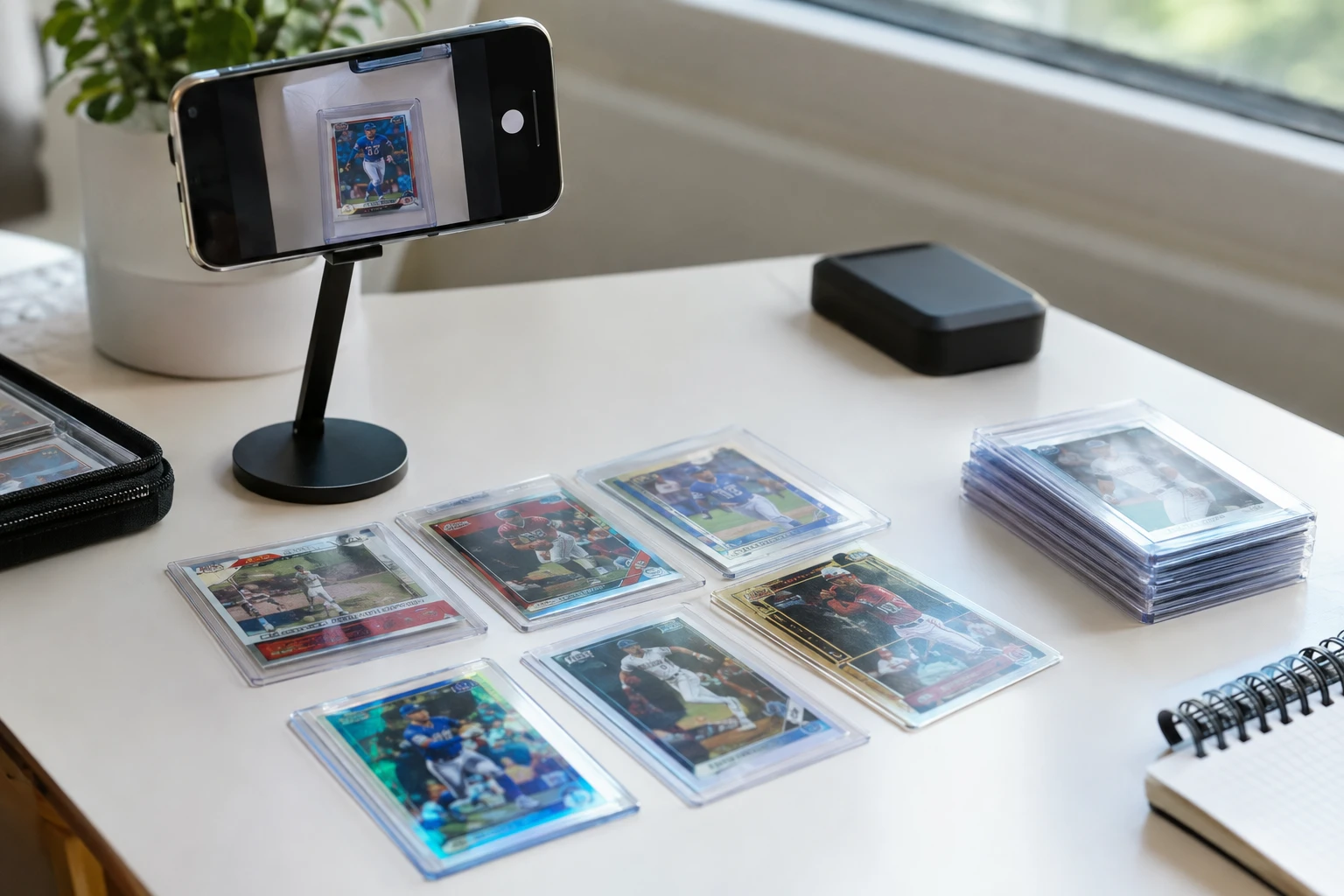
Your home grading setup directly determines the accuracy of your AI analysis. A poor setup produces inaccurate results; a good setup produces reliable grade predictions. Here is the optimal home grading setup:
Lighting (Most Critical Factor)
Diffuse, even lighting is everything in card condition analysis. Direct harsh light creates shadows that hide condition issues and glare that creates false surface flags.
Best option: Two softbox LED lights — one on each side at 45-degree angles. This eliminates shadows and provides even illumination across the entire card surface. Available for $40–80 for a basic two-light kit.
Good option: Diffuse natural window light — indirect natural light on an overcast day provides excellent even diffuse illumination. Avoid direct sunlight which creates harsh shadows.
Avoid: Direct flash, single overhead light, desk lamps at close range. These create directional shadows and glare that degrade AI analysis accuracy.
Camera / Smartphone
Any modern smartphone (iPhone 12+, Samsung Galaxy S20+, or equivalent) produces sufficient resolution for AI analysis. Use the highest quality photo setting. Key rules:
- Turn off HDR processing for card photos — HDR can alter color and surface appearance
- Photograph straight overhead — camera lens parallel to card face, no angle
- Use a phone stand or tripod to eliminate hand-shake blur
- Tap to focus on the card center before shooting
Background Surface
Use a neutral background that contrasts with the card borders:
- White-bordered cards (Pokémon standard, most sports cards): dark gray or black background
- Black-bordered cards (Yu-Gi-Oh, early MTG): light gray or white background
- Full-bleed cards (One Piece alt art, Lorcana Enchanted): neutral gray works for most
A simple sheet of black construction paper and a sheet of light gray paper covers all cases. Tape them to a table and keep them as your dedicated grading surface.
The Four Grading Criteria: How to Assess Each at Home
Professional graders assess four criteria on every card. AI tools measure all four automatically. Here is how to understand what each means for home visual inspection:
1. Centering
Centering measures whether the printed card image is centered within the card borders. PSA 10 requires 60/40 or better left-to-right and 75/25 top-to-bottom.
Home visual tip: hold the card face-up and look at the four borders. The left and right borders should look roughly equal. The top border should be slightly larger than the bottom (cards are typically printed with the image slightly toward the bottom). If one border looks obviously wider than the opposite, the card likely fails PSA 10 centering. But visual estimation is unreliable — AI measurement is always more accurate.
2. Corners
Corner condition measures wear, fraying, and sharpness at all four card corners. Under a loupe, PSA 10 corners show no visible fraying — the corner is sharp and all printed layers are intact. PSA 9 allows very minor imperfections.
Home visual tip: hold the card under the grading light and tilt it at a low angle to catch raking light at each corner. Fraying appears as white or gray fuzzing at the corner tip.
3. Edges
Edge condition measures the four edges of the card for chipping, whitening, nicks, or fraying. Black-bordered cards show whitening clearly; white-bordered cards show it less.
Home visual tip: run a fingernail very lightly along the edges under the grading light. Do not touch the face or corners. Edge nicks are visible as bright white spots along the dark edge print.
4. Surface
Surface condition measures scratches, print lines, print defects, and surface haze on both the card face and card back. This is the hardest factor to assess by eye — micro-scratches visible to a grader under a loupe are invisible under normal inspection.
Home visual tip: tilt the card under the grading light to create raking light across the surface. Scratches show as bright lines against the card surface. But even experienced collectors miss surface issues that AI catches — this is where AI provides the biggest accuracy advantage over human home inspection.
AI Grading Tools You Can Use at Home in 2026
Multiple AI grading tools are available for home use. Here is how they compare:
PreGradeCards (pregradecards.com)
The most comprehensive AI grading platform for home use. Covers all major card types with calibrated algorithms per card type (Pokémon standard/full-art, MTG standard/foil/vintage, Yu-Gi-Oh, One Piece standard/alt art/Treasure Rare, sports cards by era, Dragon Ball Super, Lorcana, and more). Features:
- Free credits for new users — grade your first batch at no cost
- Per-card grade prediction with confidence rating
- Condition flags by factor (centering, corners, edges, surface)
- PSA 10 probability score per card
- ROI calculator integration — combine grade prediction with live market prices
CardGrade.io
AI card grading across PSA, BGS, and CGC predictions. Sports card focused with strong baseball, basketball, and football calibration. Plans from $4.99/month.
TCG AI Pro
Specialized for TCG cards with per-TCG surface algorithms. Strong on Dragon Ball, One Piece, and Pokémon. Free tier available.
TAG Grading's Own AI (for TAG submissions)
TAG provides its own AI-assisted assessment as part of its professional grading process — this is the grader's own system, not a home tool. But TAG's DIG report output gives collectors a data reference comparable to home AI analysis results.
How Accurate Is Home AI Grading vs Professional PSA Grading?
AI home grading accuracy varies by card type and setup quality. Here are the realistic accuracy ranges based on available verified PSA return data:
| Card Type | AI Accuracy (within ±0.5 of PSA) | Notes |
|---|---|---|
| Modern Pokémon (bordered) | 88–92% | Largest training set; best accuracy |
| Modern Pokémon (full-art/SIR) | 84–88% | Full-bleed centering adds variance |
| MTG Standard | 85–90% | Good accuracy on non-foil |
| MTG Foil | 80–86% | Foil surface analysis adds uncertainty |
| One Piece Standard | 85–90% | Strong on standard cards |
| One Piece Treasure Rare | 78–84% | Multi-layer finish creates uncertainty |
| Modern Sports Cards | 83–88% | ChromeRefractor adds ~3–5% variance |
| Vintage Sports (pre-1980) | 75–82% | Fewer training examples; higher variance |
| Lorcana Enchanted | 83–87% | Improving as training set grows |
Key caveat: accuracy is on correctly photographed cards with proper setup. Poor lighting, camera angle, or low resolution will produce inaccurate AI results. The numbers above assume correct home setup as described in this guide.
When to Use a Loupe and Magnification for Home Grading
A 10x loupe is the standard tool for home card inspection. Under 10x magnification, the following become visible that aren't apparent to the naked eye:
- Corner fraying — tiny paper fibers at the corner tips, invisible without magnification
- Edge nicks — micro-chips along the edge print, especially on black-bordered cards
- Surface micro-scratches — fine scratches on glossy or foil surfaces
- Print line defects — thin parallel lines from the printing process
- Foil stamp scratches — especially relevant for Dragon Ball Super and MTG cards
When to Use the Loupe
Use a loupe as a second-opinion tool on high-value cards where the AI analysis shows borderline results or low confidence. AI analysis that returns 9.0 (borderline) warrants a loupe inspection of the specific flagged area. AI analysis that returns 9.5+ or below 7.5 doesn't need loupe confirmation — the grade is clear enough to act on directly.
Loupe Recommendation
A 10x loupe from any photography supply or grading supply vendor ($10–30) is sufficient. Higher magnification (30x, 60x) is unnecessary for standard PSA-style grading criteria and creates an artificially harsh inspection that doesn't match PSA's actual grading standards.
When to Self-Grade (AI) vs Submit to PSA: The Decision Framework
The correct application of home AI grading vs professional submission:
Use AI Home Grading When:
- You want to know the grade before deciding whether to sell raw or submit
- You are screening a large batch to identify the gem-mint candidates
- The card's raw value is under $30 (not worth submitting professionally)
- You want to understand condition flags to improve handling/storage going forward
- You are buying raw cards and want condition verification before purchase
Submit to PSA When:
- AI home grade returns 9.5–10 AND raw value is $30+ with meaningful PSA 10 premium
- You need authenticated provenance for a high-value card
- You plan to sell on eBay or COMC where PSA slab adds liquidity
- The card is vintage and authentication (not just grading) has value
The Golden Rule
Never submit to PSA without a home AI grade first. The $79.99 minimum fee with 50-business-day turnaround makes every submission a capital decision. AI home grading filters that decision to only the high-probability-PSA-10 candidates before any fees are paid.
Complete Home Card Grading Workflow: Step by Step
- Set up your grading station. Two lights at 45-degree angles, neutral background for the card color, phone stand, maximum camera resolution.
- Remove card from sleeve and holder. Never photograph through protective materials.
- Do a naked-eye pass. Look for obvious centering issues, corner fraying, edge whitening. This takes 10 seconds and eliminates the worst candidates before even opening the AI tool.
- Photograph front. Straight overhead, even lighting, no glare. Tap to focus on center.
- Photograph back. Same setup. Back condition (especially edge whitening on Lorcana, corner fraying on vintage, print quality on 1980s cards) often reveals issues the front hides.
- Upload both photos to PreGradeCards. Select correct card type, set, and era for calibrated analysis.
- Read the AI report: Overall grade prediction, centering ratio, corner grade, edge grade, surface grade, confidence level.
- Use the loupe on borderline results (8.5–9.0 AI grade). Check the specific flagged area — AI often identifies the problem location in the condition flags.
- Apply the submission decision framework. AI 9.5–10 + positive ROI math = submit to PSA. AI 8.5–9 = CGC or hold. AI below 8.5 = sell raw.
- Track results. Over time, compare your AI predictions to returned PSA grades. Note where your photography setup is producing mismatches and adjust technique.
Frequently Asked Questions
Can I grade cards at home without sending to PSA?
What is the best home card grading setup?
How accurate is AI card grading compared to PSA?
Do I need a loupe to grade cards at home?
When should I submit to PSA instead of home grading?
What is the cheapest way to grade cards in 2026?
Sources & Further Reading
- AI Card Grading Online — CardGrade.io
- TCG AI PRO Grading Tool
- SnapGradeAI Verified Returns
- PSA Grading Cost 2026 — PreGradeCards
- Is Grading Worth It in 2026? ROI Guide
Marcus Chen has evaluated over 50,000 sports cards and TCG cards across PSA, BGS, SGC, and CGC standards. Before joining PreGradeCards, he worked as a submission specialist for a major grading company and trained collectors and dealers on condition assessment.
Create a free account and get 1 free credit — enough for 1 complete AI grading with market pricing. No credit card required.
Sign Up Free →